Benchmark Card
Share your benchmark results as a beautiful, branded image. One command generates a card you can post on Reddit, X, Discord, or any social platform.
Quick start
asiai bench --quick --card --share    # Bench + card + share in ~15 seconds
asiai bench --card --share            # Full bench + card + share
asiai bench --card                    # SVG + PNG saved locally
Example
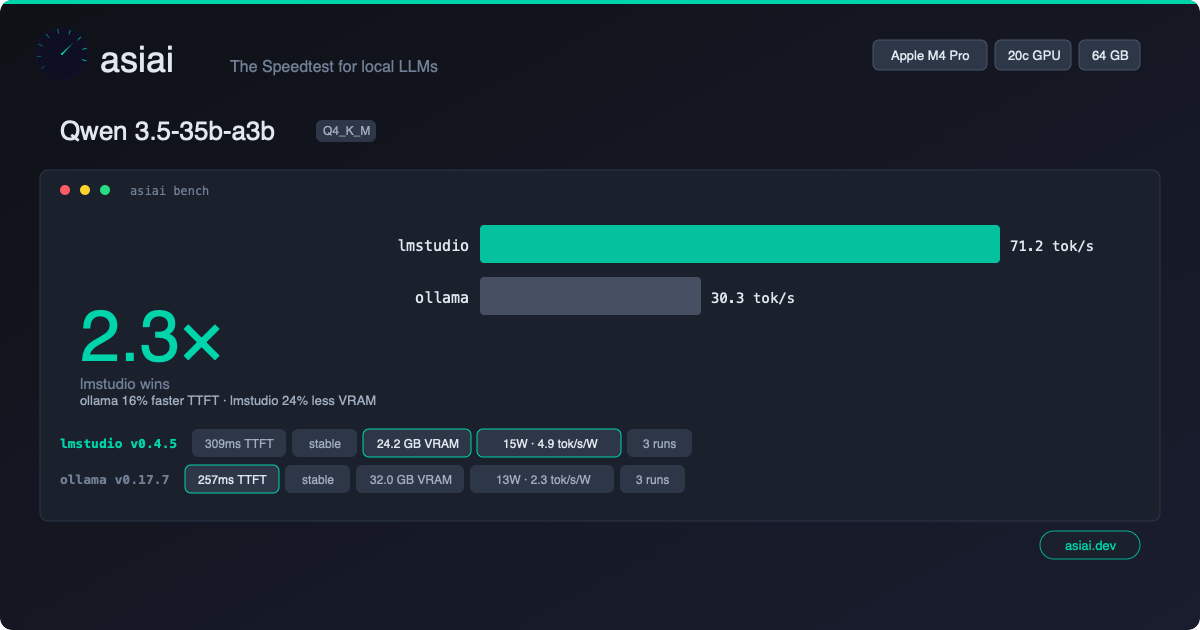
What you get
A 1200x630 dark-themed card (OG image format, optimized for social media) containing:
- Hardware badge — your Apple Silicon chip prominently displayed (top-right)
- Model name — which model was benchmarked
- Engine comparison — terminal-style bar chart showing tok/s per engine
- Winner highlight — which engine is faster and by how much
- Metric chips — tok/s, TTFT, stability rating, VRAM usage
- asiai branding — logo mark + "asiai.dev" pill badge
The format is designed for maximum readability when shared as a thumbnail on Reddit, X, or Discord.
How it works
asiai bench --card --share
        │
        ▼
  ┌──────────┐     ┌──────────────┐     ┌──────────────┐
  │ Benchmark │────▶│ Generate SVG │────▶│  Save local   │
  │  (normal) │     │  (zero-dep)  │     │ ~/.local/     │
  └──────────┘     └──────┬───────┘     │ share/asiai/  │
                          │             │ cards/         │
                          ▼             └──────────────┘
                   ┌──────────────┐
                   │ --share ?    │
                   │ Submit bench │
                   │ + get PNG    │
                   └──────┬───────┘
                          │
                          ▼
                   ┌──────────────┐
                   │ Shareable    │
                   │ URL + PNG    │
                   │ downloaded   │
                   └──────────────┘
Local mode (default)
SVG generated locally with zero dependencies — no Pillow, no Cairo, no ImageMagick. Pure Python string templating. Works offline.
Cards are saved to ~/.local/share/asiai/cards/. SVG is perfect for previewing locally, but Reddit, X, and Discord require PNG — add --share to get a PNG and a shareable URL.
Share mode
When combined with --share, the benchmark is submitted to the community API, which generates a PNG version server-side. You get:
- A PNG file downloaded locally
- A shareable URL at
asiai.dev/card/{submission_id}
Use cases
Reddit / r/LocalLLaMA
"Just benched Qwen 3.5 on my M4 Pro — LM Studio 2.4x faster than Ollama" [attach card image]
Benchmark posts with images get 5-10x more engagement than text-only posts.
X / Twitter
The 1200x630 format is the exact OG image size — it displays perfectly as a card preview in tweets.
Discord / Slack
Drop the PNG in any channel. The dark theme ensures readability on dark-mode platforms.
GitHub README
Display your personal benchmark results in your GitHub profile README:

Combine with --quick
For fast sharing:
asiai bench -Q --card --share
This runs a single prompt (~15 seconds), generates the card, and shares — perfect for quick comparisons after installing a new model or upgrading an engine.
Design philosophy
Every shared card includes the asiai branding. This creates a viral loop:
- User benchmarks their Mac
- User shares the card on social media
- Viewers see the branded card
- Viewers discover asiai
- New users benchmark and share their own cards
This is the Speedtest.net model adapted for local LLM inference.